 Firmdesk
Year-end bookkeeping checklist
What to reconcile, review and close at a client's fiscal year-end, and what to gather from the client, so the books are ready for the financial statements and the tax return. Use it as it is, print it, or have the Word and PDF copies emailed to you.
The year-end checklist for bookkeepers
Five stages, for one client's fiscal year. For a sole proprietor, skip the shareholders and directors.
1. Before the year-end
- The fiscal year-end confirmed, and who prepares the statements and the return
- The date the accountant needs the books by
- The client's list of what to send you (section 4), sent ahead of time
- Every month up to the last one closed and reviewed
2. Reconcile every account
- Every bank account, to its year-end statement
- Every credit card, to its statement
- Loans and lines of credit, to the lender's statements, with the interest split out
- Payment processors and clearing accounts, down to what's really in transit
- Petty cash, counted
- GST/HST and QST accounts, to the returns filed for the year
- Payroll accounts, to the remittances made
- The shareholder loan or owner's account: draws, contributions, expenses paid personally
3. Review and adjust
- Uncategorized and suspense accounts cleared
- Receivables: the aged list reviewed with the client, bad debts agreed
- Payables: this year's bills that arrived after the year-end
- Sales in the right year: invoices, deposits, work done but not yet billed
- Fixed assets: purchases and sales, each with its invoice
- Prepaid expenses and accruals, as agreed with the accountant
- Inventory at cost, from the client's count at the year-end
- Personal expenses paid from the business accounts, moved out
- The income statement compared with last year's, and anything odd explained
4. Gather from the client
- Bank and credit card statements for the year, and for the month after
- Loan and line of credit statements at the year-end
- Payroll: the T4 summary and the remittance statements
- The sales tax returns filed for the year
- Invoices or agreements for equipment, vehicles or property bought or sold
- The inventory count at the year-end, at cost
- Changes to the shareholders, the directors or the address
- New leases, contracts and loans, and letters from the CRA or Revenu Québec
5. Close the year and hand it over
- The trial balance and general ledger at the year-end
- Each reconciliation, with its statement
- Lists of receivables, payables and fixed assets at the year-end
- Your adjusting entries, each with a note on why
- The year locked in the accounting software, so nothing changes by accident
- Once the statements are done: the accountant's adjustments entered, the opening balances checked
One email, with a copy you can change. Nothing more unless you ask.
The client's part, as a Firmdesk request
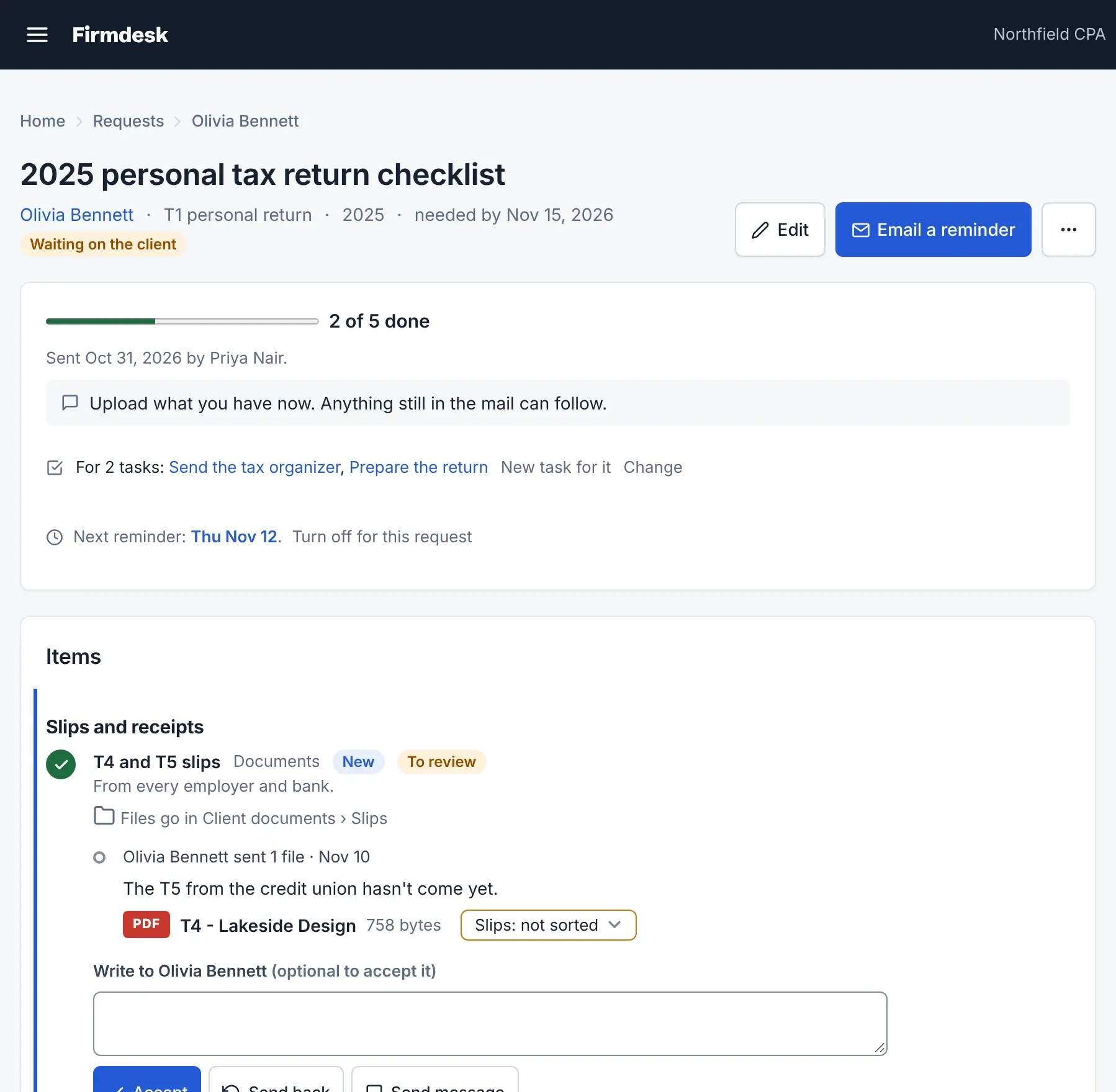
Section 4 is close to a request template Firmdesk comes with: the Year-end checklist. Send it, and each client answers item by item in your client portal.
- Send it to one client, or to many at once: Firmdesk lists your active clients with the template's service, and you untick the ones to leave out.
- Each client gets their own copy, to answer on a phone or a computer: files, a yes or no, an amount, or a tick for what doesn't apply.
- You accept each item, or send it back with a note saying what's missing.
- Reminders go out until it's complete, if you turn them on for the client.
The picture is a personal tax request at Northfield CPA, our made-up demo firm. A request made from the template works the same way.
What the Year-end checklist asks for
| Item, as the client sees it | What the client does |
|---|---|
| The year's records | |
| Bank and credit card statements for the year Every account, up to and including the month after year-end. | Documents: uploads the files |
| Your bookkeeping at year-end A trial balance and general ledger, or tell us how to get into your accounting software. | Documents: uploads the files |
| Loan and line of credit statements at year-end Attach them, or tick it off if there are none. | General: marks it done, with a note or files |
| Payroll: the T4 summary and remittance statements If the company has employees. Tick it off if it doesn't. | General: marks it done, with a note or files |
| Sales tax returns filed for the year GST/HST, and QST in Québec. Tick it off if the company isn't registered. | General: marks it done, with a note or files |
| About the year | |
| Did the company buy or sell equipment, vehicles or property? | Information: answers yes or no |
| The invoices or the sale agreements One for each purchase or sale. | Documents: uploads the files. Asked only after a Yes to the question above |
| Inventory at year-end, at cost 0 if the company doesn't hold inventory. | Information: enters a dollar amount |
| Did the shareholders, the directors or the company's address change? | Information: answers yes or no |
| What changed, and on what date? | Information: types an answer. Asked only after a Yes to the question above |
| Anything else we should see New leases or contracts, loans, letters from the CRA or Revenu Québec. | General: marks it done, with a note or files |
Your firm sees it as Year-end list. It's needed within 30 days of sending, and filed under each client's T2 corporate return, when it has one, in the year you send it for. It's an organizer: its items sit under two headings, and 2 of them are asked only after a Yes, such as the invoices for equipment the company bought. It's written for a firm that prepares a company's statements and return, so it asks for the bookkeeping at year-end. It's your firm's own copy: if you keep the books yourself, take that item out, add what you need, and file it under Bookkeeping instead.
Firmdesk for bookkeepers: each client's monthly or quarterly close with its date, their sales tax and payroll deadlines, and the statements you need from them.
More for bookkeepers: the client onboarding checklist, and How much should a bookkeeper charge?
Try it with your own clients
Sign up, and the checklist is waiting on your first page, ready to use.
Free to try. See pricing