 Firmdesk
T1 checklist for accounting firms
A T1 intake process for a firm: what to send, collect, prepare, review and file for each personal return, from January to the notice of assessment. Use it as it is, print it, or have the Word and PDF copies emailed to you.
The T1 intake process, step by step
Five stages, for one client or one household. Section 2 is the client's part: send it to them as a list.
1. Before the season
- Last year's T1 clients listed: who is coming back, who is new, who has left
- Each household together: the spouse or partner, and the dependants with a return of their own
- The fee and what it covers, agreed in an engagement letter or your terms
- Your authorization to represent each person with the CRA, still valid
- The client's list of what to send (section 2), sent with the date you need it by
- For a new client: last year's return and notice of assessment
2. Collect from the client
- Tax slips: T4, T4A, T5, T3, T5008 and the others they received
- RRSP and FHSA contribution receipts
- Medical expense receipts, for the family
- Donation receipts
- Tuition (T2202) and childcare receipts
- Changes in the family: a marriage or separation, a new child, a death, a move to another province
- Income that isn't on a slip: self-employment, rent, tips, income from outside Canada
- A home, a cottage, shares or other property sold during the year
- Property held outside Canada, and what it cost
- Work from home or other employment expenses, with the employer's T2200
- Instalments paid during the year
- A new address, phone number or bank account for the refund
- Letters from the CRA or Revenu Québec since the last return
3. Prepare the return
- The slips received compared with the ones the CRA has on file
- Amounts carried from last year: RRSP room, tuition, losses, instalments
- The spouse's or partner's return prepared with it, and the credits shared between them
- This year's return compared with last year's, and each large change explained
- Your questions sent to the client as one list, not one at a time
- Anything missing noted, with who is waiting for what
4. Review and sign
- The return reviewed by someone other than the preparer, where your firm does that
- The client shown the result: the refund or the balance, and why it changed
- The T183 signed by the client before you file, with the date and time kept
- Your invoice sent, or the fee taken as you agreed
5. File and close
- The return filed, and the confirmation kept with the client's records
- The client's copy of the return delivered
- The balance and its due date told to the client, and next year's instalments if there are any
- The notice of assessment compared with the return when it comes, and any difference followed up
- Notes for next year: what was late, what to ask for sooner, what changed
One email, with a copy you can change. Nothing more unless you ask.
The client's part, as a Firmdesk request
Section 2 is close to a request template Firmdesk comes with: the Personal tax return checklist. Send it, and each client answers item by item in your client portal.
- Send it to one client, or to many at once: Firmdesk lists your active clients with a T1 return, and you untick the ones to leave out.
- Each client gets their own copy, to answer on a phone or a computer: photos of slips, a yes or no, or a tick for what doesn't apply.
- A question that needs more, such as the sale of a property, asks for it only after a Yes.
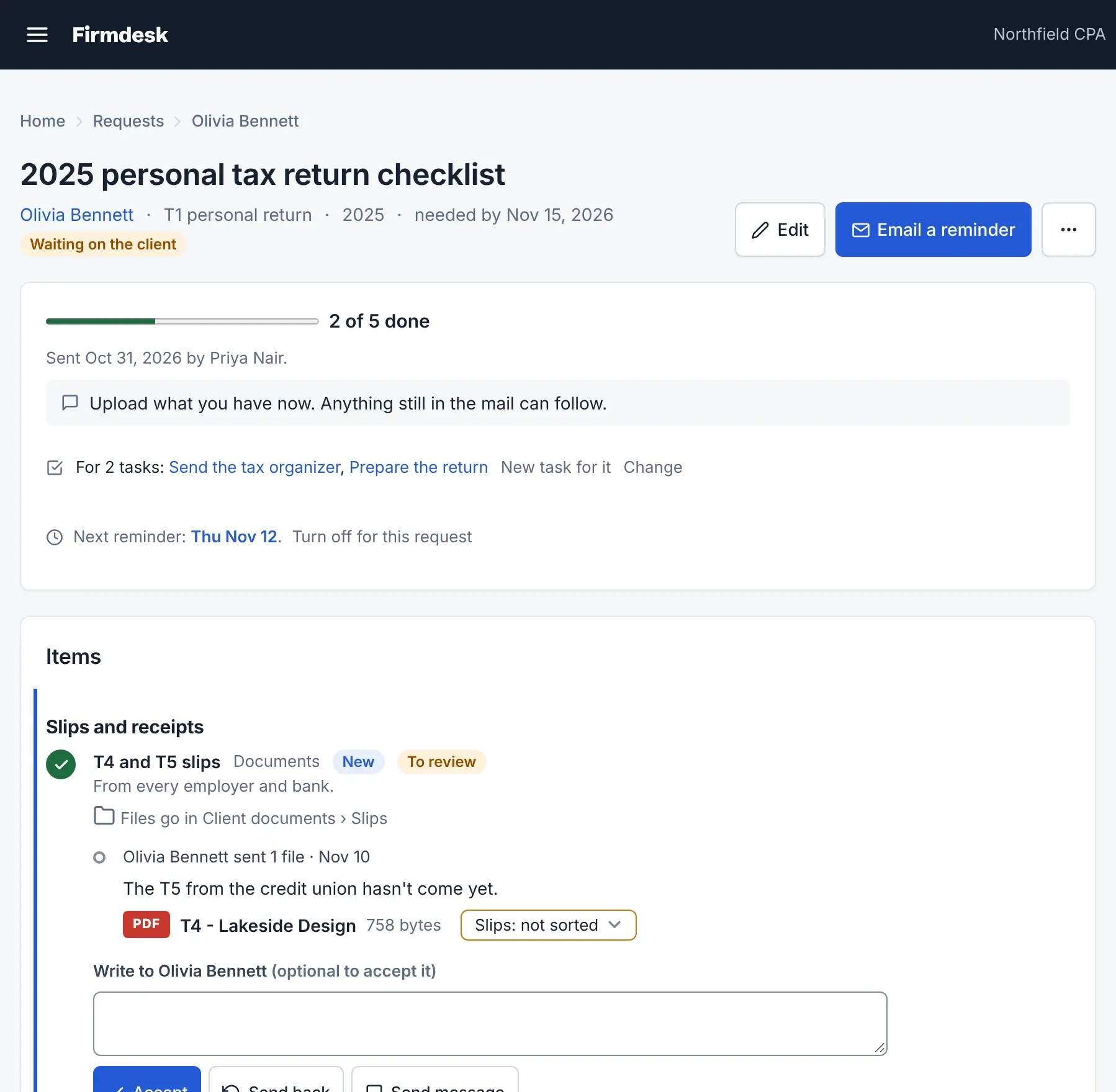
- What they send is filed in the year's folders, and you say what each slip is, T4 or T5, from the request's page.
- You accept each item, or send it back with a note saying what's missing.
- Reminders go out until it's complete, if you turn them on for the client.
- A spouse and dependants sit under one main client as a household, each with their own return.
The picture is a personal tax request at Northfield CPA, our made-up demo firm.
What the Personal tax return checklist asks for
| Item, as the client sees it | What the client does |
|---|---|
| Your slips and receipts | |
| Your tax slips: T4, T4A, T5, T3, T5008… Every slip you received for the year. | Documents: uploads the files |
| RRSP and FHSA contribution receipts Attach them, or tick it off if there are none. | General: marks it done, with a note or files |
| Medical expense receipts Prescriptions, dental, glasses, travel insurance. Attach them, or tick it off if there are none. | General: marks it done, with a note or files |
| Donation receipts Attach them, or tick it off if there are none. | General: marks it done, with a note or files |
| Tuition (T2202) and childcare receipts Attach them, or tick it off if there are none. | General: marks it done, with a note or files |
| About your year | |
| Your marital status on December 31 | Information: picks one: Married, Living common-law, Widowed, Divorced, Separated, Single |
| Did your family situation change this year? A marriage or separation, a new child, a move to another province. | Information: answers yes or no |
| What changed, and on what date? | Information: types an answer. Asked only after a Yes to the question above |
| Did you earn income that isn't on a slip? Self-employment, rent, tips, income from outside Canada. | Information: answers yes or no |
| That income, and what you spent to earn it A summary, or your statements and receipts. Attach what you have. | General: marks it done, with a note or files. Asked only after a Yes to the question above |
| Did you sell a home, a cottage or other property? | Information: answers yes or no |
| The sale documents The sale agreement and the statement of adjustments, and what you paid for the property. | Documents: uploads the files. Asked only after a Yes to the question above |
| Anything else we should know? Something new this year, a question, a letter from the CRA. Attach anything useful. | General: marks it done, with a note or files |
Your firm sees it as T1 checklist. It's needed within 21 days of sending, and filed under each client's T1 personal return, in the year you send it for. It's an organizer: its items sit under two headings, the marital status is one to pick, and 3 of its items are asked only after a Yes, so a client who answers No has a shorter list. It's shorter than section 2 on purpose: a client finishes a short list. It's your firm's own copy, so add what your clients need, such as property outside Canada or employment expenses.
When the return is ready, the client signs the T183 in the same portal, with the date and time kept beside the signed copy: e-signatures.
More checklists: the client onboarding checklist and the year-end bookkeeping checklist.
Try it with your own clients
Sign up, and the checklist is waiting on your first page, ready to use.
Free to try. See pricing